From Vibe Coding to Production: Building a Dual-AI Development Workflow
From Vibe Coding to Production: Building a Dual-AI Development Workflow
There's a moment every solo developer knows: you start with an idea, open your editor, and just vibe. No plan, no architecture docs, just code flowing from your fingertips. It feels productive. It feels creative.
And then, three weeks later, you're staring at a codebase that looks like a crime scene.
This is the story of how I built DealPing—a real-time deal alert app—and the workflow I developed to turn "vibe coding" into something sustainable.
The Problem with Vibe Coding
I started DealPing the way most side projects begin: with enthusiasm and no planning. I had a simple goal—get push notifications when OzBargain posted deals matching my keywords. How hard could it be?
Fast forward a few weeks, and I had:
- A React Native app that mostly worked
- A Node.js backend that was one bad deploy away from disaster
- A website that was just a single HTML file
- No documentation, no tests, no clear architecture
The code worked. But I couldn't confidently change anything without fear of breaking something else.
Enter the AI Pair Programmer
When I started using AI assistants for coding, my initial approach was simple: ask questions, get code, paste it in. This was just "vibe coding with extra steps."
The breakthrough came when I realized AI agents aren't just code generators—they're process partners. The key insight:
Different tasks require different AI capabilities.
Not every task needs the most powerful model. But planning and code review absolutely do. Meanwhile, straightforward execution can use a more cost-effective model.
This led me to develop what I call the Dual-AI Workflow - here is how it looks like:
📍 Session Status

Session Type: 🔄 RETURNING (Context Restored)
Branch: session/2026-02-12-1000 ✓
Last Session: Phase 5 API Migration + Dual-AI Workflow
Current Task: Website Polish & Mute Feature
Phase: PLANNING
Next Action: Deploy Website (Vercel)

"Dual-AI Workflow Suggestion The "Mute Feature" is likely a Medium task."

    1. `/plan_task` with Architecture AI
    2. `/execute_task` with Engineer AI
    3. `/review_task` with Architecture AI

Ready to proceed! Should we start with the Vercel deployment?
Architecture AI (You are here)
↓
Plans 1, 2, 3 approved ✅
↓
Switch to Engineer AI
↓
/execute_task → Execute Plan 1
/execute_task → Execute Plan 2
 /execute_task → Execute Plan 3
↓
Single /approve for all 3
↓
(Optional) Switch back to Architecture AI for /review_task
Here's how the flow looks conceptually:
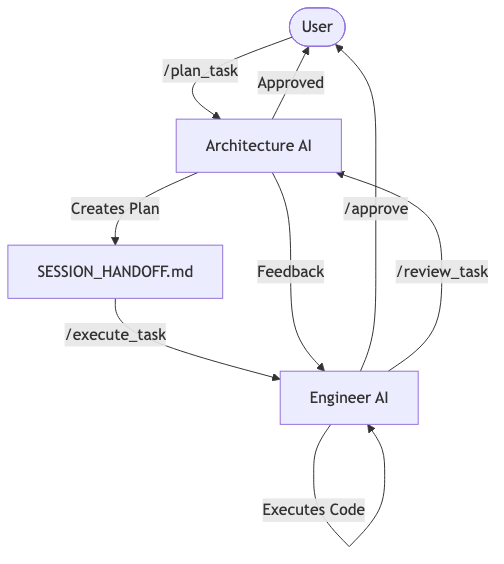
The Architecture AI / Engineer AI Split
The core idea is simple: separate planning from execution.
Architecture AI (The Thinker)
Uses the strongest available model. Responsible for:
- Analyzing requirements
- Creating detailed implementation plans
- Reviewing completed work
- Making design decisions
Engineer AI (The Builder)
Uses a cost-effective execution model. Responsible for:
- Following the plan step by step
- Writing production code
- Running tests and verifications
- Documenting what was built
The Handoff Protocol
The magic is in the handoff. I created a file called SESSION_HANDOFF.md that acts as a "contract" between the two agents:
## Current Task

- **Name**: API Migration to Vercel
- **Phase**: AWAITING_EXECUTION
- **Artifacts**: task.md, implementation_plan.md
- **Next Agent**: Engineer AI
When Architecture AI finishes planning, it updates this file and prompts me to switch models. When Engineer AI finishes executing, it updates the file and prompts me to switch back for review.
What This Looks Like in Practice
Here's a real example from building DealPing's API migration:
Step 1: I describe what I want
"I want to migrate the API from Railway to Vercel."
Step 2: Architecture AI analyzes The stronger model reads my codebase, identifies all the moving parts, and creates:
- A task breakdown with 20+ checklist items
- An implementation plan with exact file changes
- A verification strategy
Step 3: I review the plan This is crucial. Architecture AI might be smart, but it doesn't know my preferences. I caught several issues at this stage that would have been expensive to fix later.
Step 4: Engineer AI executes With the plan approved, I switch to a more cost-effective model. It follows the plan methodically, creating files, modifying code, and checking off items.
Step 5: Architecture AI reviews Back to the stronger model. It compares what was built against what was planned. In my case, it caught a subtle authentication bug that would have been a security issue in production.
The Workflow Files
I codified this process into three workflow files:
| Workflow | Trigger | Agent |
|---|---|---|
/plan_task | New feature/complex task | Architecture AI |
/execute_task | Plan approved | Engineer AI |
/review_task | Execution complete | Architecture AI |
Each workflow has explicit handoff steps. The AI literally tells you when to switch models.
Lessons Learned
1. Not Every Task Needs Planning
I added a "task sizing" gate. Small tasks (< 1 hour, obvious fixes) skip the Architecture AI entirely. Don't over-engineer the process.
2. The Plan Is a Contract
The implementation plan isn't just documentation—it's the acceptance criteria. If Engineer AI deviates, it must document why. If Architecture AI rejects, it must be specific.
3. SESSION_HANDOFF.md Is the Source of Truth
Every session starts by reading this file. It answers: "What was I doing? What's next? Who should be doing it?"
4. Branch Discipline Matters
I learned this the hard way. I once started a session on yesterday's branch without syncing with main. Hours of conflict resolution later, I added mandatory branch date validation to my workflows.
5. Review Is Worth the Cost
Running the stronger model for code review seems expensive until you consider the alternative: shipping bugs to production. The review step has caught security issues, performance problems, and logic errors.
The Results
Since implementing this workflow:
- Deployment confidence: I can ship changes without fear
- Reduced context switching: The handoff protocol preserves state between sessions
- Better documentation: Every task has a plan and a walkthrough
- Cost efficiency: I'm not running expensive models on trivial tasks
Impact by the Numbers
Since switching to this workflow for the last 3 sprints:
- 60% Reduction in Debugging Time: By catching logic errors in the planning phase.
- Zero Critical Bugs in Production: The dual-layer review catches edge cases that "vibe coding" misses.
- 4x Feature Velocity: We shipped the new API migration in hours instead of the estimated week.
Try It Yourself
If you're using AI for coding, here's my recommendation:
- Identify your phases: What needs deep thinking? What's mechanical execution?
- Create explicit handoffs: Write down what information needs to pass between phases
- Use the right tool for the job: Match model capability to task complexity
- Review your own process: The meta-lesson is that process itself is a thing worth building
The days of "vibe coding" aren't over. There's still room for creative flow. But now I have a framework to turn that creative spark into production-ready software.
DealPing is a real-time deal alert app for OzBargain. Built with React Native, Node.js, Supabase, and a lot of lessons learned.